Birden fazla kanal, ortak çalışma alanı
Müşteri görüşmelerini kanal ve durumlarına göre inceleyin. WhatsApp’tan gelen bir talebi veya web sitenizde başlayan bir konuşmayı aynı panelden takip edin.
Ürünler Molvek Bot
Müşteri sorularını yanıtlayın, satış fırsatlarını takip edin, randevuları yönetin ve kampanyalarla yeniden iletişim kurun. Molvek Bot, yapay zekâyı müşteri iletişiminiz ve ekibinizin günlük işleriyle buluşturur.
Müşterileriniz için. İlgili yanıtlar, kesintisiz bir görüşme ve net bir sonraki adım.
Ekibiniz için. Müşteri geçmişi, satış takibi, yapay zekâ desteği ve karar vermeyi kolaylaştıran içgörüler.
Müşteri iletişimi
WhatsApp, web sohbeti, Instagram ve Telegram görüşmelerini ekibinizin çalışma alanına taşıyın. Tekrarlayan soruları Molvek Bot karşılasın; ilgi ve deneyim gerektiren konuşmalara ekibiniz odaklansın.
Müşteri görüşmelerini kanal ve durumlarına göre inceleyin. WhatsApp’tan gelen bir talebi veya web sitenizde başlayan bir konuşmayı aynı panelden takip edin.
Ürünleriniz, hizmetleriniz ve çalışma biçiminiz hakkındaki soruları işletmenizin bilgileriyle yanıtlayın. Müşterinin ihtiyacını konuşma içinde netleştirin.
Farklı dillerde gelen mesajları karşılayın. Markanızın üslubunu koruyarak müşterinin kendini rahat ifade edebileceği bir iletişim kurun.
İnsan desteği isteyen veya operatör ilgisi gerektiren görüşmeleri devralın. Önceki mesajları görerek konuşmaya kaldığı yerden devam edin.
İlgisi yüksek müşteri adaylarını ve desteğe ihtiyaç duyan görüşmeleri panelde görün. Takip önceliğinizi belirleyip doğru konuşmaya odaklanın.
WhatsApp mesajlarının gönderim, teslim ve okunma durumlarını izleyin. Müşteriye ulaşılıp ulaşılmadığını görüşmenin içinde takip edin.
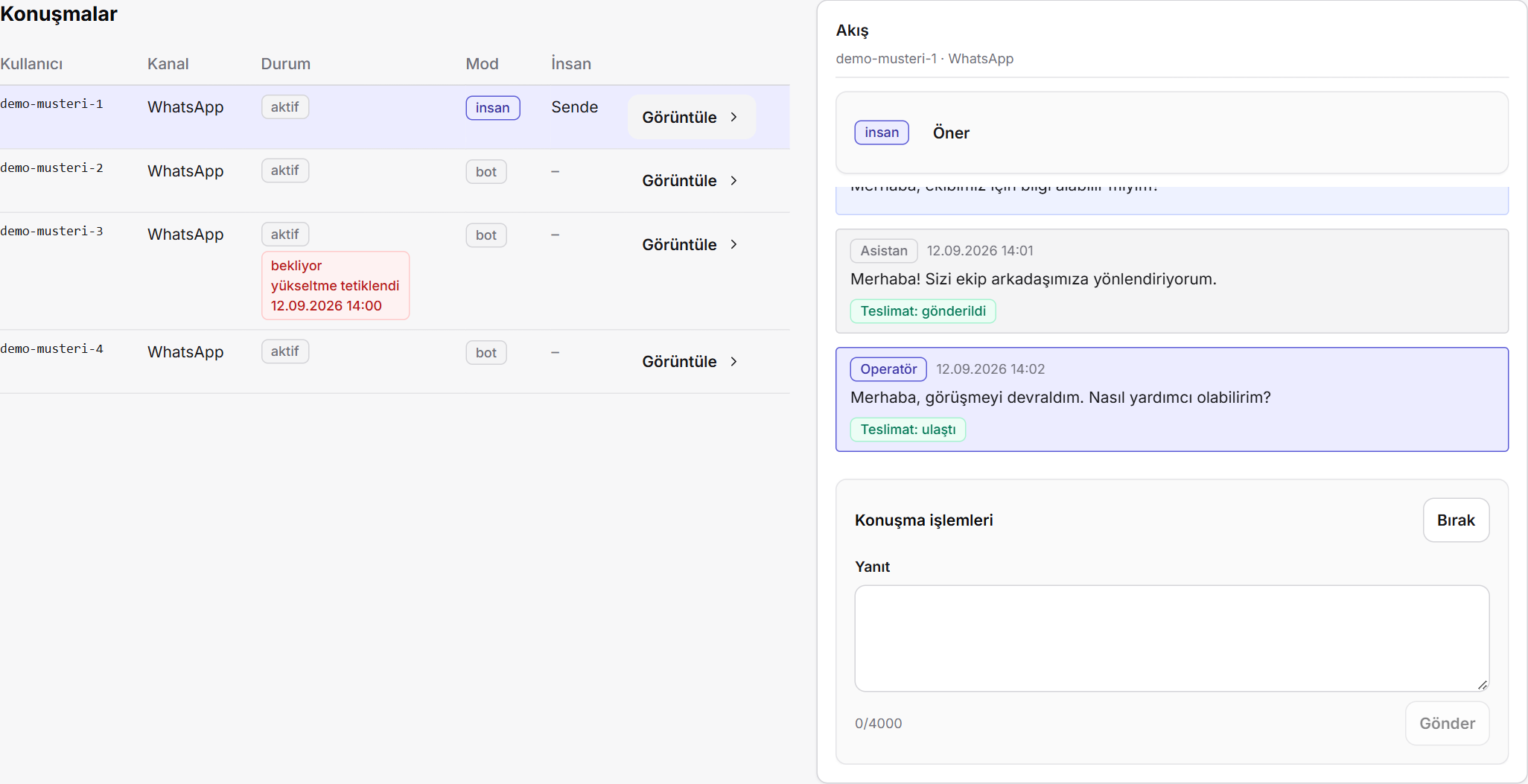
Görüşmeyi takip edin, müşteriniz ekibinize ihtiyaç duyduğunda devralın.
Bilgi bankası
Ürün bilgilerini, hizmet açıklamalarını ve sık sorulan soruları tek yerde toplayın. Molvek Bot’un verdiği yanıtları kendi içeriğiniz ve marka üslubunuzla şekillendirin.
PDF, DOCX, CSV, TXT ve Markdown dosyalarını bilgi bankasına ekleyin. Hazır belgeleriniz müşteri sorularını yanıtlamak için kullanılsın.
Doğrudan metin ekleyin ve güncel belgelerinizi yeniden yükleyin. Değişen hizmet ve ürün bilgilerini aynı yerden yönetin.
Asistanın kimliğini, tonunu ve yanıt kurallarını belirleyin. Müşteri iletişimini işletmenizin tercih ettiği anlatım biçimiyle yürütün.
Yanıtlarda kullanılan belgeleri ve bilgi bankası boşluğu göstergelerini izleyin. Bu bilgilerle içeriklerinizi geliştirin.
CRM ve satış
Müşteri bilgisini, görüşme geçmişini ve satış fırsatlarını bir araya getirin. Kimin ilgilendiği, fırsatın hangi aşamada olduğu ve sırada ne yapılacağı ekibiniz için görünür olsun.
Konuşmada paylaşılan iletişim bilgilerini, müşterinin ilgisini ve görüşme notlarını müşteri adayı kaydında toplayın. İlk temas, takip edilebilir bir kayda dönüşsün.
Telefon, e-posta ve notları bağlı görüşmelerin zaman çizelgesiyle birlikte görün. Önceki yazışmayı aramadan müşteriyi tanıyarak devam edin.
Birden fazla satış süreci oluşturun; aşamaları adlandırın ve sıralayın. Süreci, tekliften satışa işletmenizin çalışma biçimine uyarlayın.
Fırsatları listede inceleyin veya Kanban panosunda sürükleyerek ilerletin. Satış hattınızın tamamını ve her aşamadaki işleri görün.
Sorumlu kişi, tutar, para birimi, tahmini kapanış tarihi, son temas ve sonraki adımı kaydedin. Takip için gereken bilgiler fırsatın yanında dursun.
Fırsatları ekip arkadaşlarınıza atayın. Notları, aşama değişikliklerini ve atama geçmişini aynı kayıtta izleyin.
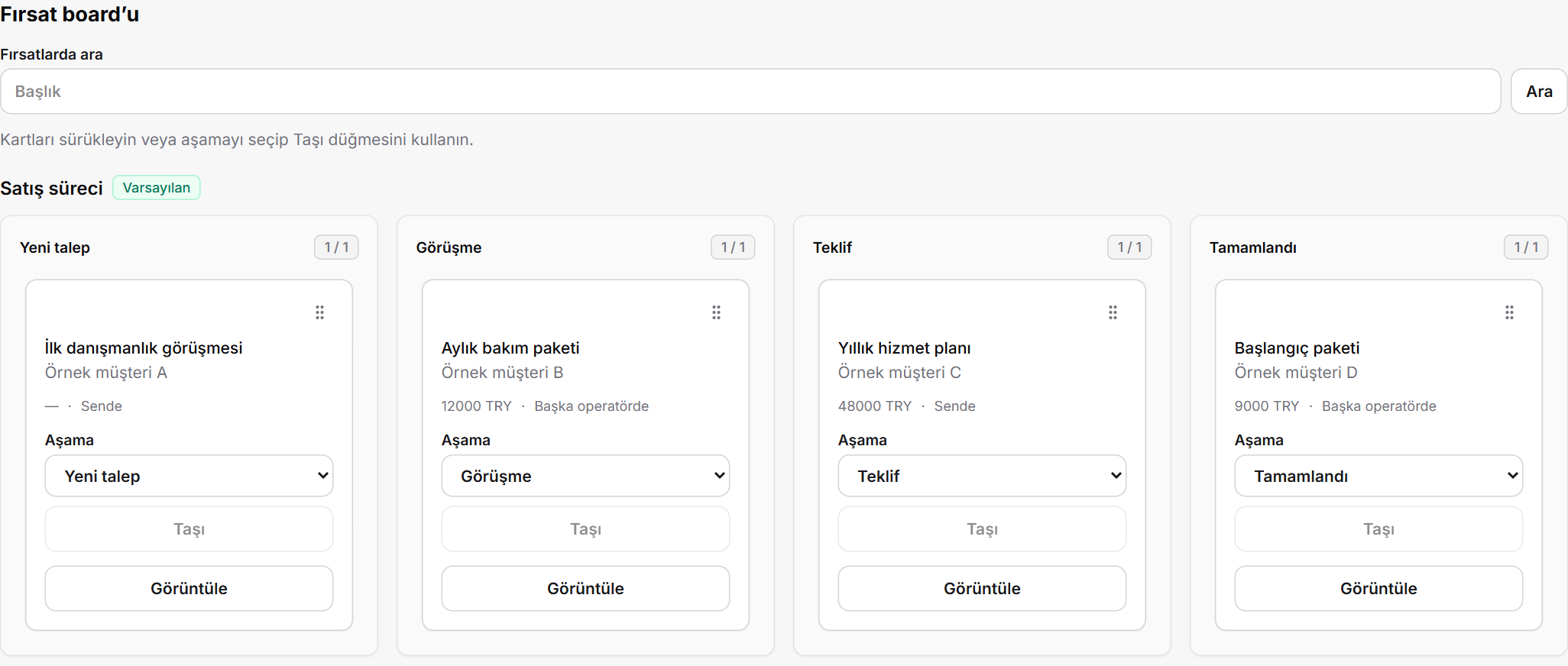
Fırsatları satış sürecinizin aşamalarıyla birlikte takip edin.
Randevu ve takip
Müşteriyle kararlaştırılan randevuyu kayda alın, Google Takvim ile birlikte yönetin ve hatırlatmalarla görüşme öncesi iletişimi sürdürün.
Müşteriyle netleşen tarih, saat ve randevu bilgilerini konuşmadan kayda dönüştürün. Görüşmenin sonucunu ekibinizin iş akışına taşıyın.
Randevuları işletmenizin Google Takvim’ine ekleyin. Müşteri görüşmeleriyle takvimdeki işleri birlikte takip edin.
Bağlı randevuların saat değişikliklerini ve iptallerini takip edin. Takvimde güncellenen randevu bilgileri Molvek’teki kayda yansısın.
WhatsApp üzerinden randevu hatırlatmaları gönderin. Şablonlar ve sessiz saatlerle görüşme öncesi iletişimi düzenleyin.
WhatsApp kampanyaları
Müşteri ve fırsat bilgilerinizden hedef kitle oluşturun. Mesaj şablonlarını, iletişim izinlerini ve kampanyanın sonuçlarını aynı çalışma alanında yönetin.
Satış aşaması, son temas, sorumlu kişi ve fırsat tutarına göre hedef kitlenizi filtreleyin. Aynı mesajı herkese göndermek yerine ilgili müşteri grubuna ulaşın.
Meta şablonlarını yenileyin; onay durumunu, dilini ve kategorisini görün. Kampanyanıza uygun şablonu seçin.
Şablon değişkenlerini doldurup mesaj metnini inceleyin. Alıcı listesini ve gönderim dışında kalan kişileri gerekçeleriyle görün.
İletişim izinlerini ve ret geçmişini kişi bazında takip edin. Kalıcı hariç tutmaları yönetin; izin kayıtlarını CSV’den aktarmadan önce kontrol edin.
Kampanyaları başlatın, duraklatın, sürdürün veya durdurun. Gönderim ilerlerken çalışma durumunu panelden izleyin.
Kampanyanın ilerleyişini ve alıcı sonuçlarını inceleyin. Gönderilen, başarısız ve sonucu belirsiz mesajları ayırarak sonraki takibinizi planlayın.
Ekibiniz için yapay zekâ
Molvek Bot’un işletme asistanı, ekibinizin günlük soruları ve işleri için ayrı bir çalışma alanı sunar. Görüşmeleri inceleyin, verilerinizi sorgulayın ve bulguları işe dönüştürün.
Görüşmenin özetini ve yanıt taslağını hazırlatın. Taslağı düzenleyin, kendi değerlendirmenizi ekleyin ve müşteriye gönderin.
Görüşmeleriniz ve iletişim performansınız hakkında doğal dille soru sorun. İlgili konuşmaları ve ayrıntıları asistanla inceleyin.
Asistanla yaptığınız çalışmadan kaydedilebilir raporlar oluşturun. Kişisel sohbet oturumlarınıza geri dönüp kaldığınız yerden devam edin.
Notion sayfa ve kayıtlarını işletme asistanıyla okuyun, oluşturun ve güncelleyin. Bilgiyi günlük işlerinizi yürüttüğünüz alanlara taşıyın.
Analitik ve raporlama
Görüşme trafiğini, satış hattını ve asistanın katkısını birlikte değerlendirin. Günlük, haftalık ve aylık özetlerle neyin iyi gittiğini ve nereye odaklanmanız gerektiğini görün.
Mesaj, müşteri adayı, randevu ve insan desteğine geçiş verilerini birlikte izleyin. Müşteri iletişiminizin nasıl ilerlediğini görün.
Saatlik trafik dağılımını ve kanal bazında mesaj hacmini inceleyin. Ekibinizin zamanını müşterilerinizin yazdığı saatlere göre planlayın.
Ortalama ve medyan ilk yanıt sürelerini görün. Bot ve insan yanıtlarını karşılaştırarak hizmet akışınızı değerlendirin.
Açık fırsatları, toplam değerleri ve aşama dağılımını raporlayın. Kazanılan ve kaybedilen işleri, dönüşümü, bekleme sürelerini ve yaklaşan kapanışları inceleyin.
Günlük, haftalık ve aylık işletme özetlerini otomatik hazırlayın. Geçmiş raporlara panelden dönün ve raporlarınızı Notion’da paylaşın.
Bot yanıtlarının model bazında kullanımını ve tahmini maliyetini takip edin. Kullanım eğilimlerini işletmenizin iletişim hacmiyle birlikte değerlendirin.
Ekip ve bağlantılar
Görüşmelerin sorumluluğunu netleştirin, erişimi rollerle düzenleyin ve kullandığınız araçları Molvek Bot’a bağlayın. Günlük takibi ekibinizin ortak işine dönüştürün.
Görüşmeleri operatörlere atayın ve ekip rollerini yönetin. Herkesin ilgilendiği işleri ortak panel üzerinden takip edin.
İnsan desteği bekleyen görüşmeleri takip edin. Tarayıcı bildirimleriyle yeni gelişmelerden haberdar olun.
Müşteri, fırsat ve satış aşamalarını Notion ile iki yönlü eşitleyin. Eşitleme durumunu panelden izleyin; aynı bilgiyi iki yerde takip etme yükünü azaltın.
Kanalların, bilgi bankasının, asistan ayarlarının ve bağlantıların durumunu görün. İşletmenizin çalışma alanını tek panelden yönetin.
Müşteri iletişiminizi, satış sürecinizi ve ekibinizin günlük işlerini anlatın. Molvek Bot’u sizin ihtiyaçlarınız üzerinden birlikte inceleyelim.
Molvek OÜ · Estonya
Products Molvek Bot
Answer your customers, build your sales pipeline, manage appointments and reach out with campaigns. Molvek Bot brings AI, customer communication and your team’s daily work together.
For your customers. Useful answers, a connected conversation and a clear next step.
For your team. Customer history, sales follow-up, an AI assistant and the insight to move forward.
Conversations
Bring WhatsApp, web chat, Instagram and Telegram conversations into your team’s workspace. Let Molvek Bot handle recurring questions while your team focuses on conversations that need personal attention.
Review conversations by channel and status. Follow a WhatsApp enquiry or a conversation that started on your website from the same panel.
Answer questions about your products, services and how you work using your business knowledge. Help clarify what the customer needs as the conversation develops.
Respond to messages in different languages. Keep your brand’s voice while making it easier for customers to express what they need.
Take over when a conversation needs an operator or a customer asks for human support. Read the previous messages and pick up where the conversation left off.
See signals for interested leads and conversations needing attention. Set your follow-up priorities and focus on the right conversations.
Track sent, delivered and read statuses for WhatsApp messages. See whether a message reached the customer within the conversation.
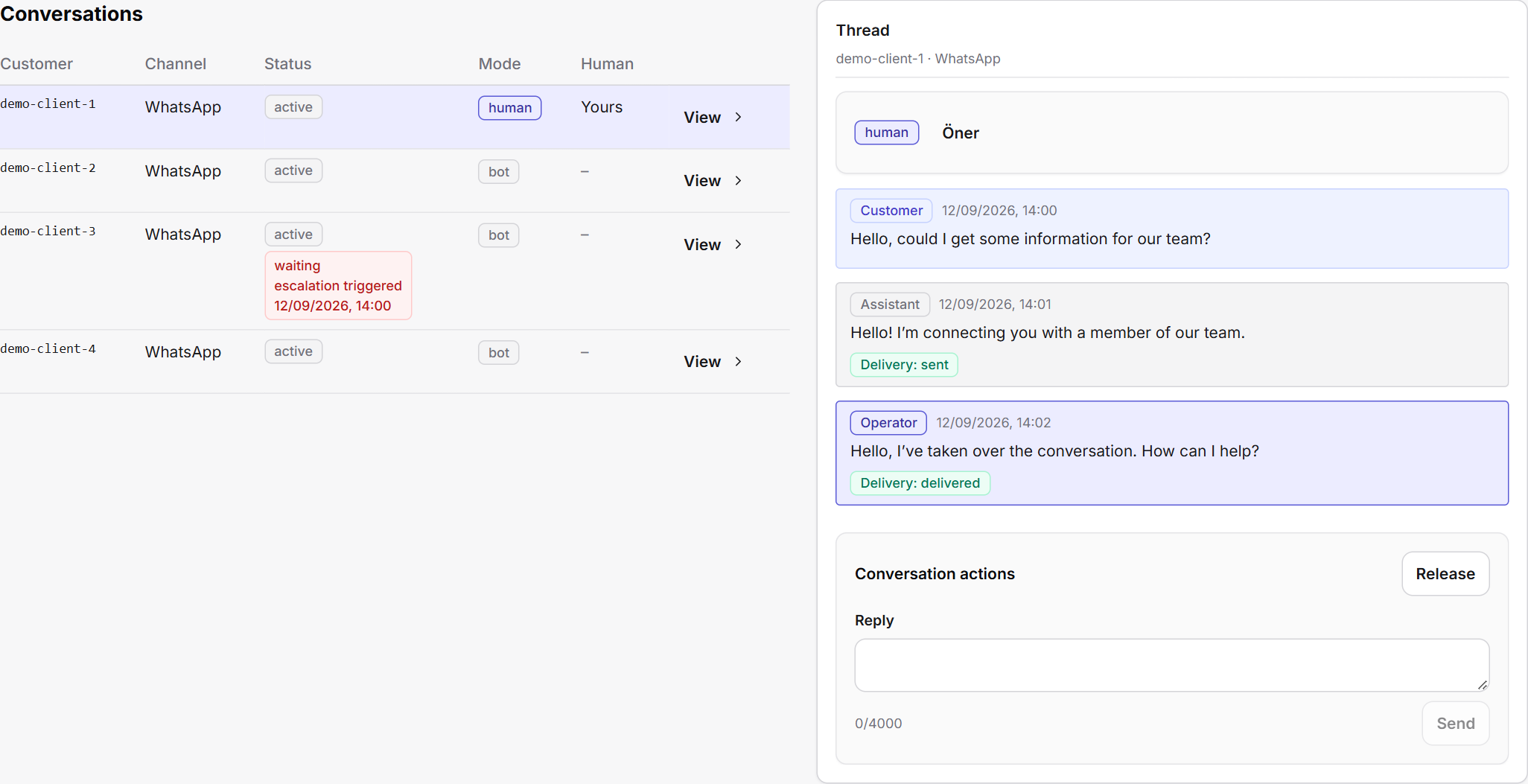
See the conversation and step in when a customer needs your team.
Knowledge base
Bring product information, service descriptions and common questions together. Shape Molvek Bot’s answers with your own content and brand voice.
Add PDF, DOCX, CSV, TXT and Markdown files to your knowledge base. Use the documents you already have to support customer answers.
Add text directly and upload updated versions of your documents. Manage changes to your services and products in one place.
Define the assistant’s identity, tone and response guidelines. Keep customer communication aligned with the way your business speaks.
Track document usage and indicators of gaps in your knowledge base. Use these insights to guide content improvements.
CRM and sales
Bring customer details, conversation history and sales opportunities together. Give your team a clear view of who owns each opportunity, where it stands and what should happen next.
Capture contact details, customer interest and conversation notes in a lead record. Turn the first interaction into something your team can follow up.
View phone numbers, email addresses and notes alongside the timeline of linked conversations. Continue with context instead of searching for the last exchange.
Create multiple sales pipelines, name their stages and arrange them in order. Match the process to the way your business moves from enquiry to sale.
Review opportunities in a list or move them across a Kanban board. See your whole pipeline and the work at each stage.
Record the owner, value, currency, expected close date, last contact and next step. Keep the information needed for follow-up beside the opportunity.
Assign opportunities to teammates. Keep notes, stage changes and assignment history in the same record.
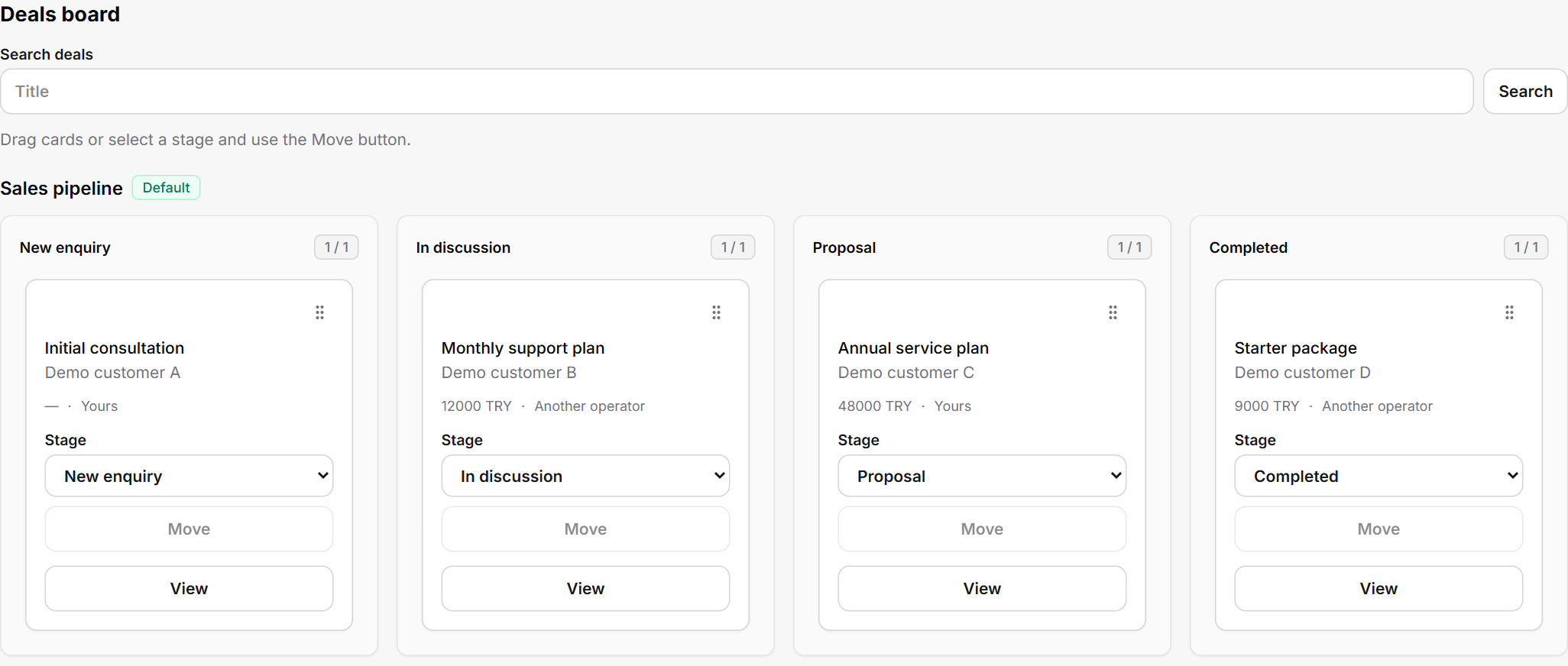
Follow opportunities through the stages of your sales process.
Appointments
Record the appointment agreed with your customer, manage it with Google Calendar and keep the conversation going with reminders.
Turn the agreed date, time and appointment details into a record. Bring the outcome of the conversation into your team’s workflow.
Add appointments to your business’s Google Calendar. Keep customer conversations and scheduled work connected.
Follow changes and cancellations for linked appointments. Reflect updated calendar details in the corresponding Molvek record.
Send appointment reminders over WhatsApp. Use message templates and quiet hours to organise communication before the meeting.
WhatsApp campaigns
Build audiences from your customer and opportunity data. Manage message templates, communication permissions and campaign results in the same workspace.
Filter audiences by sales stage, last contact, owner and opportunity value. Reach a relevant customer group instead of sending the same message to everyone.
Refresh your Meta templates and view their approval status, language and category. Choose the template that fits your campaign.
Fill in template variables and review the message. Preview the recipient list and see who is excluded and why.
Track communication permissions and opt-out history per contact. Manage permanent exclusions and review consent records before importing them from CSV.
Start, pause, resume or stop campaigns. Monitor their status as sending progresses.
Review campaign progress and recipient results. Distinguish sent, failed and uncertain outcomes to plan your next follow-up.
AI for your team
Molvek Bot’s business assistant gives your team a separate workspace for everyday questions and tasks. Review conversations, explore your data and put the findings to work.
Generate a conversation summary and a reply draft. Edit the draft, add your judgement and send it to the customer.
Ask natural-language questions about conversations and communication performance. Explore relevant exchanges and their details with the assistant.
Create saved reports from your work with the assistant. Return to your personal chat sessions and continue where you left off.
Read, create and update Notion pages and records with the business assistant. Bring information into the spaces where you manage everyday work.
Analytics and reporting
Review conversation traffic, your sales pipeline and the assistant’s contribution together. Use daily, weekly and monthly summaries to understand what is working and where to focus.
Track messages, leads, appointments and human handoffs together. Understand how your customer communication develops.
Review hourly traffic and message volume by channel. Plan your team’s time around when customers get in touch.
View average and median first-response times. Compare bot and human responses to assess your service workflow.
Report on open opportunities, their value and stage distribution. Review won and lost deals, conversion, time in the pipeline and upcoming close dates.
Automatically prepare daily, weekly and monthly business summaries. Revisit past reports in the panel and share them in Notion.
Track model usage and estimated costs for bot replies. Review usage trends alongside your business’s communication volume.
Team and integrations
Make conversation ownership clear, organise access with roles and connect the tools you use to Molvek Bot. Make daily follow-up a shared team effort.
Assign conversations to operators and manage team roles. Follow the work each teammate is handling in the shared panel.
Keep track of conversations waiting for human support. Receive browser notifications about new activity.
Sync contacts, opportunities and sales stages with Notion in both directions. Monitor sync status in the panel and reduce the work of maintaining information in two places.
See the status of channels, knowledge, assistant settings and integrations. Manage your business workspace from one panel.
Tell us how your team handles conversations, sales and daily work. Let’s explore Molvek Bot together around your needs.
Molvek OÜ · Estonia