İşin içinden tasarım
Bir ekran daha eklemek için değil; günlük işte gerçekten karşılığı olan çözümler için çalışıyoruz.
Müşteri mesajlarını yanıtlayan, satış fırsatlarını takip eden, Google Takvim uygunluğuna göre randevu oluşturan ve görüşmeleri ekibinize devreden işletme yazılımı.
Yapay zekânın desteği. Ekibinizin kontrolü.
İhtiyaç, müşteri kaydı ve görüşme geçmişi bir arada.
Molvek’in ürünleri
MolvekMüşteri konuşmaları, takip edilmesi gereken işler ve ekibiniz. Molvek, aralarındaki mesafeyi kısaltır.
Müşterinin sorusunu işletmenizin bilgileri ve üslubuyla yanıtlayın.
Konuşmadaki ihtiyacı müşteri kaydı ve satış fırsatıyla birlikte takip edin.
Birlikte kararlaştırılan gün ve saati, takip edilebilir bir randevuya taşıyın.
Ekibiniz görüşmeyi devralırken geçmişi ve Öner’in hazırladığı özeti yanında bulsun.
İşin içinden üç senaryo
Bir saat sorusu, bir fiyat bilgisi, bir destek ihtiyacı. Konuşmanın işletmenizde nasıl bir sonraki adıma dönüştüğünü görün.
Örnek konuşmalar ve kayıtlar kurgusaldır; gerçek müşteri verisi veya canlı işlem içermez.
Örnek web görüşmesi
İşletme panelinde
Ekibiniz randevuyu, durumunu ve kaynak konuşmayı aynı panelde takip eder.
Bu kısa örnek; gerekli iletişim bilgileri ve müşteri onayı tamamlandığında, bağlı Google Takvim’de uygunluk doğrulanıp kayıt başarıyla oluşturulduğunda geçerli olan akışı gösterir.
Randevu ekranını görünÖrnek web görüşmesi
İşletme panelinde
Müşterinin paylaştığı iletişim bilgileri, ilgisi ve görüşme notlarıyla takibi sürdürün.
Süre ve fiyat bu senaryo için kurgusaldır. Gerçek yanıt işletmenizin bilgi kaynaklarına dayanır; kaynakta fiyat yoksa tutar uydurulmaz.
CRM ve adayları görünÖrnek web görüşmesi
İşletme panelinde
Operatör geçmişi inceleyerek yanıtlar; gerektiğinde Öner’den özet ve yanıt taslağı ister.
Ekip yanıtı, bir operatör görüşmeyi devraldıktan sonraki örnektir. Ekip çevrimdışıysa müşteriye dönüş saati sözü verilmez.
Görüşme ekranını görünKendi işletmenizle başlayın
Demo görüşmesi beklemeden başlayın. İşletmenizin bilgisini ekleyin, yanıtları deneyin ve hazır olduğunuzda müşterilerinize açın.
Hesabınızı oluşturun ve e-postanızı doğrulayın. Web sitenizi ekleyin; siteniz yoksa işletme bilgilerinizi kendiniz girin.
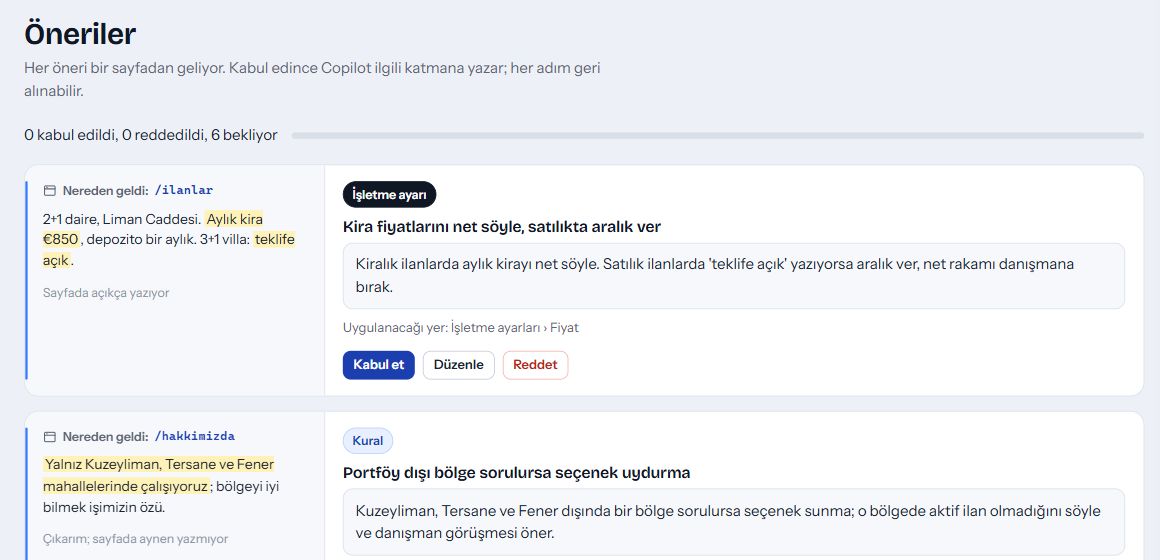
Sitenizden hazırlanan bilgi ve kural önerilerini kaynaklarıyla inceleyin. Düzenleyin, kabul edin veya reddedin; neyin kullanılacağına siz karar verin.
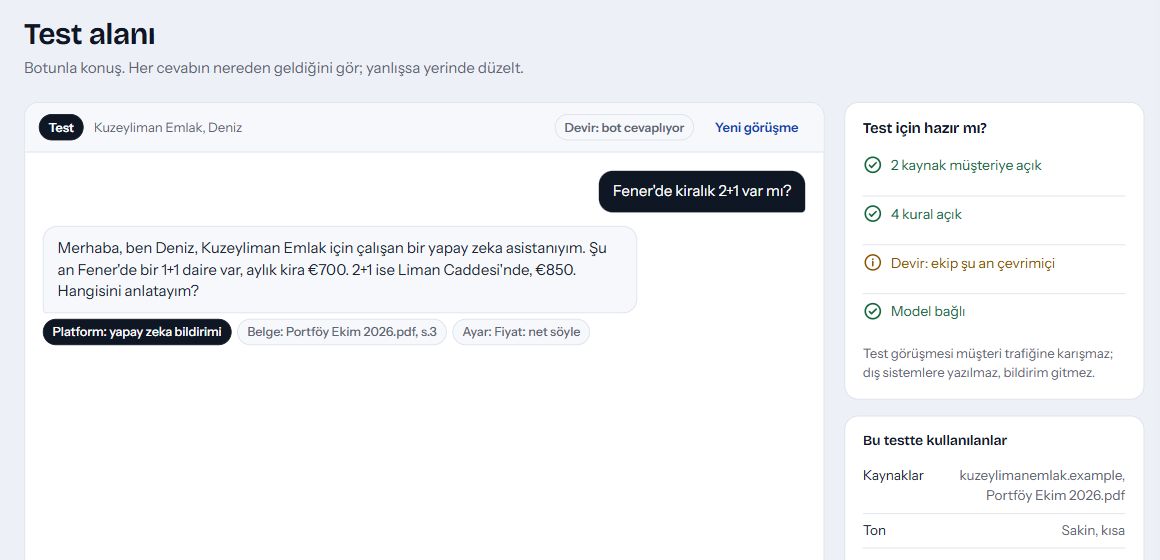
Test alanında sorular sorun, yanıtın dayandığı kaynakları görün. Bilgileri ve kuralları düzeltip yeniden deneyin.
Web sohbetini sitenize ekleyin veya işletmenizin mesajlaşma kanallarını bağlayın. WhatsApp ve Instagram bağlantıları ilgili hesap, izin ve Meta gerekliliklerine bağlıdır.
Kart gerekmez. Şirket e-postasıyla 14 gün, diğer adreslerle 7 gün; 300 yapay zekâ cevabı.
İşletme asistanınız
Görüşmeleri inceletin, işletme verilerinize soru sorun ve bulguları panelinizde rapor olarak saklayın. Yapılacak işi kendi cümlelerinizle anlatın.
Bu haftanın görüşmelerini özetle ve rapor olarak kaydet.
Görüşmeleri inceledim. Öne çıkan ihtiyaçları ve takip edilecek konuları bir raporda topladım.
İhtiyaçlar, sorular ve sonraki adımlar
Workspace
Ekibiniz görev oluştursun; sorumlu, son tarih ve durum aynı yerde kalsın. Yapılacak işleri ve tamamlananları kolayca takip edin.
Workspace’i keşfedinDemo Müşteri · 8 kişilik ekip
Demo Müşteri · Görüşme sonrası takip
Molvek hakkında
Molvek OÜ, Estonya merkezli bir yazılım şirketidir. İşletmelerin günlük akışına uyum sağlayan, bilgiyi işe dönüştüren ürünler geliştiriyoruz.
Bir ekran daha eklemek için değil; günlük işte gerçekten karşılığı olan çözümler için çalışıyoruz.
Yapay zekâ yardımcı olur. Kararlar, ilişkiler ve işin yönü sizde kalır.
İşletmelerin gerçek ihtiyaçlarından öğrenerek ürünlerimizi geliştiriyoruz.
Molvek’i işletmeniz için keşfedin
Bir müşteriniz gibi soru sorun. Molvek’in canlı botunun yanıtını bu sayfada görün.
Aklınızdaki soruyu yazın.
Molvek’in canlı botu kendi ürün bilgileriyle yanıtlasın.
Bir takip sorusu sorun; konuşmanın nasıl ilerlediğini deneyin.
Business software that answers customer messages, tracks sales opportunities, checks Google Calendar availability to book appointments, and hands conversations to your team.
AI support. Your team in control.
The need, customer record and conversation history, together.
Products by Molvek
MolvekCustomer conversations, the work that follows, and your team. Molvek brings them closer together.
Answer customer questions with your business knowledge and voice.
Follow the customer's needs alongside their record and sales opportunity.
Turn the day and time agreed in the conversation into an appointment you can track.
Your team takes over with the conversation history and the summary prepared by Öner.
Three everyday scenarios
A question about a time, a price enquiry, a request for help. See how a conversation becomes the next step for your business.
Illustrative conversations and records; no real customer data or live transactions.
Illustrative web conversation
In the business panel
Your team follows the appointment, its status and the source conversation in the same panel.
This short example applies after required contact details and customer confirmation are complete, availability is verified on the connected Google Calendar and the booking is successfully created.
See the appointment viewIllustrative web conversation
In the business panel
Continue the follow-up with the contact details the customer shared, their interest and conversation notes.
The duration and price are fictional. Actual answers draw on your business’s knowledge sources; when a price is missing, no amount is invented.
See CRM and leadsIllustrative web conversation
In the business panel
The operator reads the history and replies, asking Öner for a summary or reply draft when needed.
The team’s reply illustrates a conversation after an operator has taken over. No reply-time promise is made when the team is offline.
See the conversation viewStart with your own business
Get started without waiting for a demo meeting. Add your business knowledge, try the answers, and open to customers when you are ready.
Create your account and verify your email. Add your website, or enter your business information yourself if you do not have one.
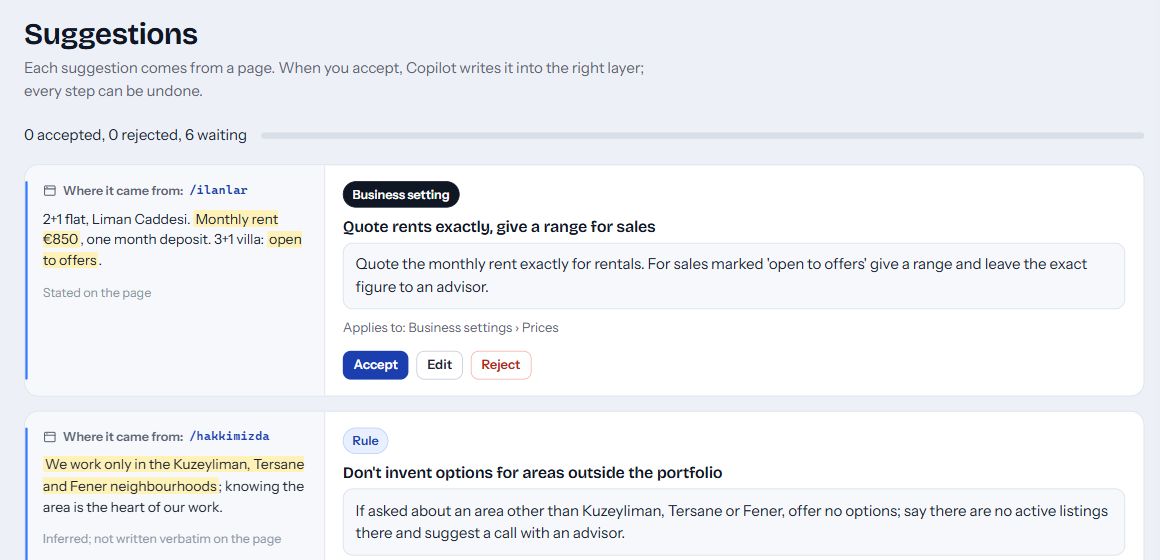
Check proposed knowledge and rules alongside their website sources. Edit, accept or reject them; you decide what is used.
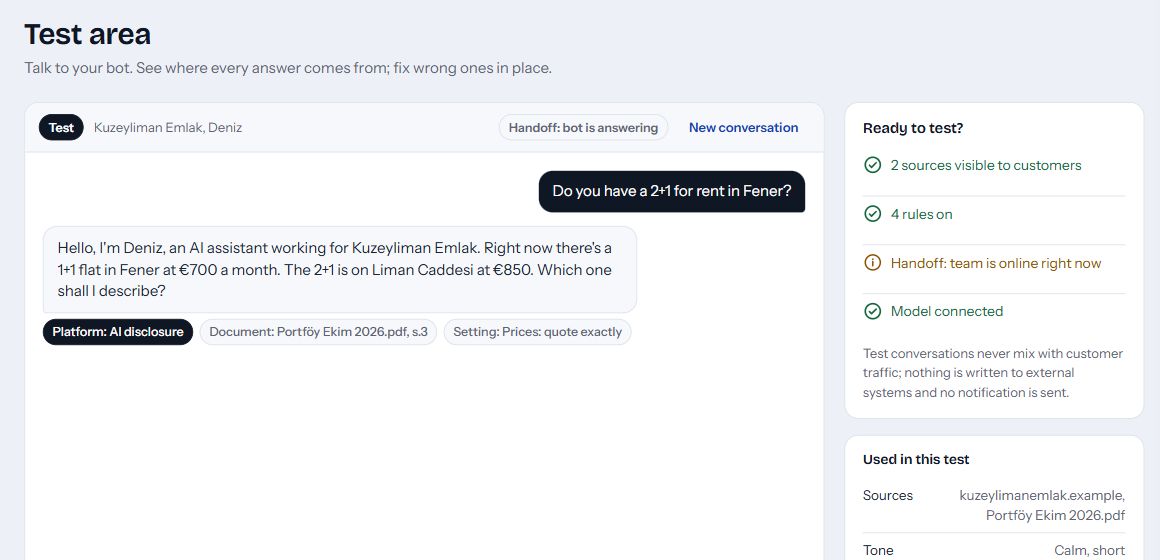
Ask questions in the test area and see the sources behind each answer. Adjust your knowledge and rules, then try again.
Add web chat to your website or connect your business messaging channels. WhatsApp and Instagram connections depend on the relevant accounts, permissions and Meta requirements.
No card required. 14 days with a company email, 7 days otherwise; 300 AI answers.
Your business assistant
Review conversations, ask questions about your business data, and save the findings as reports in your panel. Describe what you need in your own words.
Summarise this week’s conversations and save the report.
I reviewed the conversations and brought the main needs and follow-up points into a report.
Needs, questions and next steps
Workspace
Let your team create tasks with an owner, due date and status in one place. Keep track of what needs doing and what is complete.
Explore WorkspaceDemo Customer · Team of 8
Demo Customer · Meeting follow-up
About Molvek
Molvek OÜ is a software company based in Estonia. We build products that fit into everyday business and turn knowledge into useful work.
We focus on solutions that make a practical difference in your day.
AI helps. Your team keeps control of decisions, relationships and direction.
We learn from real business needs as we develop our products.
Explore Molvek for your business
Ask a question as one of your customers would. See Molvek’s live bot answer right here.
Type a question you would ask.
Molvek’s live bot answers using information about our own product.
Ask a follow-up and try the conversation for yourself.